


What kind of malware is Elbie?
Ransomware, a malicious software variant, employs encryption techniques to render files inaccessible until victims decrypt them using specific software or decryption keys. One prevalent ransomware strain, Elbie, employs a distinctive tactic by appending the victim’s ID, email address (antich154@privatemail.com), and the “.Elbie” extension to filenames.
For example, a file named “1.jpg” would be transformed into “1.jpg.id[C279F237-2994].[antich154@privatemail.com].Elbie”, while “2.jpg” would become “2.jpg.id[C279F237-2994].[antich154@privatemail.com].Elbie”, and so forth. Elbie further compounds its impact by generating two ransom notes: “info.hta” and “info.txt”. This ransomware strain belongs to the Phobos family, known for its sophisticated encryption methods and widespread proliferation.
The consequence of Elbie’s encryption onslaught is starkly evident in the screenshot below, showcasing files encapsulated in the “.Elbie” extension, effectively rendering them inaccessible to victims:

Elbie’s modus operandi represents a potent threat to data integrity and organizational security, underscoring the urgent need for robust cybersecurity measures and proactive defenses against ransomware attacks.
Elbie Ransomware: A Closer Look at its Tactics and Ransom Demands
Ransomware, a notorious form of malware, often accompanies its encryption spree with a chilling ransom note, detailing the terms for decryption and payment. Elbie ransomware, in particular, adopts a systematic approach in its ransom demands, leaving victims grappling with dire consequences.
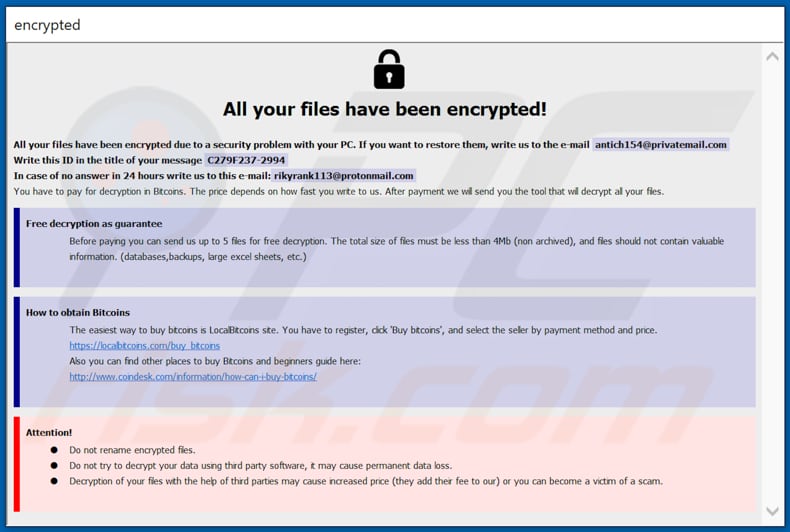
Elbie’s ransom notes serve as a grim reminder of the data hostage situation, explicitly informing victims about the encryption of their files and the exclusive access to decryption tools held by the attackers. To proceed with decryption, victims are instructed to initiate contact with the attackers through designated email addresses: antich154@privatemail.com or rikyrank113@protonmail.com.
The urgency of the situation is palpable as Elbie’s ransom notes emphasize prompt action, with the cost of the decryption tool contingent upon the speed of victim engagement. Each email correspondence must include a unique ID provided by the attackers, alongside a maximum of five encrypted files for potential free decryption. However, victims are cautioned against attaching files containing valuable information such as databases or backups.
Furthermore, a stern warning echoes through Elbie’s ransom notes, admonishing victims against employing third-party decryption software or altering encrypted files. Such actions, it asserts, may result in irreversible data loss, exacerbating the severity of the ransomware attack.
Navigating the treacherous terrain of Elbie ransomware demands a strategic response, with cybersecurity resilience and preparedness serving as invaluable assets in mitigating its impact. As organizations confront the pervasive threat of ransomware, vigilance and proactive defense mechanisms emerge as critical imperatives in safeguarding against digital extortion and preserving data integrity.
Decrypting the Complexity of Ransomware: Insights and Mitigation Strategies
Ransomware, characterized by its robust encryption algorithms, poses a formidable challenge to victims seeking to regain access to their files. In the case of Elbie ransomware, victims find themselves at the mercy of cybercriminals, with decryption tools exclusively held by the perpetrators.
Trusting cybercriminals and succumbing to ransom demands is fraught with risk, as payment often fails to yield the promised decryption tool. Instead, victims are urged to explore alternative recovery methods, with data restoration from backups emerging as the most reliable recourse.
Furthermore, the insidious nature of ransomware extends beyond file encryption, with potential for network-wide propagation and infection. Swift removal of ransomware from infected systems is imperative to prevent further spread and mitigate its impact.
While ransomware variants may differ in cryptographic techniques and ransom demands, their fundamental modus operandi remains consistent. Victims are coerced into contacting attackers, navigating the treacherous path of ransom payment in exchange for decryption keys.
However, relying on the goodwill of attackers for file recovery is precarious, underscoring the importance of robust backup strategies. Storing backups on isolated storage devices or secure remote servers, such as the Cloud, offers a lifeline for victims grappling with the aftermath of ransomware attacks.
In the ever-evolving landscape of cyber threats, proactive defenses and resilient backup solutions are indispensable in mitigating the impact of ransomware attacks and safeguarding against data loss. By prioritizing cybersecurity readiness and vigilance, organizations can fortify their defenses and emerge stronger in the face of emerging threats.
How to protect yourself from ransomware infections?
Installed software has to be updated and activated with tools or implemented functions that its official developers have designed. Third-party, unofficial tools often do not install any fixes, updates or activate software.
On the contrary, those tools install malware. Moreover, it is not legal to use unofficial (‘cracking’) tools to activate licensed software, or use hacked software. Attachments and website links in irrelevant emails sent from unknown, suspicious addresses should not be opened.
Emails of this kind often look like important letters from legitimate companies. However, they are used to deliver malware (contain malicious attachments or links). Software and files should be downloaded from official websites and through direct links.
It is not safe to open downloads that come from other sources (examples are mentioned in the previous paragraph). Files and programs should be downloaded from official websites and via direct links. The operating system should be scanned for malware regularly.
It should be done using a reputable antivirus or anti-spyware software. It is advisable to keep installed the security suite up to date. If your computer is already infected with Elbie, we recommend running a scan with Combo Cleaner Antivirus for Windows to automatically eliminate this ransomware.
Screenshot of the “info.hta” file/ransom note:


